




Product description
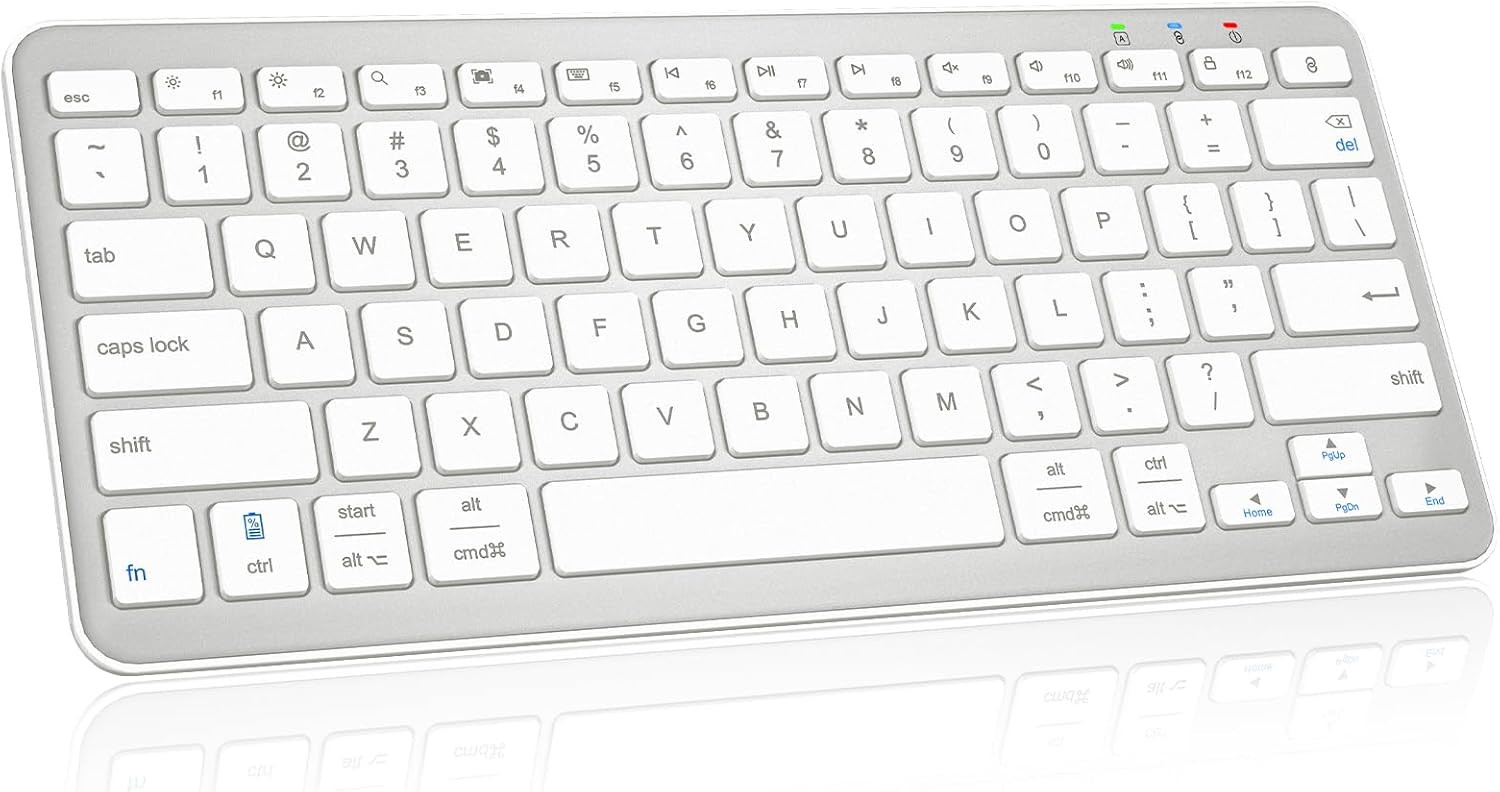
Qulose Wireless Bluetooth Keyboard 
Note:
1. This Bluetooth Mini Keyboard could automatic recognize the system, you needn’t press any specific function keys.
2. The wireless keyboard enabled to support up to 1 devices at the same time.
3. This Bluetooth 5.0 keyboard not for iMac / Windows 7 / XP / Vista.
How to Pair the Qulose Keyboard 
Step 1: On the keyboard, slide the power switch to the ON position.
Step 2: Long press “Bluetooth Pair” Key for 3 seconds to active Bluetooth of keyboard.
Step 3: Turn Bluetooth ON in settings on your device.
Step 4: Select “Qulose Keyboard” and click to connect it.
Esc Key Function 
This Bluetooth keyboard not have a home key.
The Esc key is a control key and acts like a “Cancel” button on most computers.
For example, the key can be used to close a dialog box. In input dialogs, you can remove an incorrect entry using the Escape key to clear the input field.


1 Scissor Switch Keys 2 3 Systems Keyboard 3 Ergonomic Keyboard 4 Shortcut Keys


1 Rechargeable Battery 2 Stable 5.0 Keyboard 3 Mini Size Keyboard 4 Travel Anywhere
4 Colors to Choose , find your own color to brighten up the workspace
Add to Cart
Add to Cart
Customer Reviews
4.3 out of 5 stars 1,658
4.3 out of 5 stars 1,658
4.3 out of 5 stars 1,658
4.3 out of 5 stars 1,658
Price
$18.04$18.04
$15.76$15.76
—
—
Compatibility
iOS, Windows, Android
iOS, Windows, Android
iOS, Windows, Android
iOS, Windows, Android
Scissor-Switch Keys
Yes
Yes
Yes
Yes
Power
Type -C charge
Type -C charge
Type -C charge
Type -C charge
Connected devices
Up to 1
Up to 1
Up to 1
Up to 1
Connectivity
Bluetooth
Bluetooth
Bluetooth
Bluetooth
Color
Silver White
Black
Silver Black
White
Rechargeable
Yes
Yes
Yes
Yes
Is the keyboard compatible with any system or device?
The wireless keyboard is compatible with iOS, Windows and Android system in Bluetooth mode. Note: Not compatible with iMac, Windows 7,Windows XP, Windows Vista system.
How many devices can be connected to the keyboard at the same time and how to connect?
Qulose silent Keyboard can be connected to one devices at the same time. It could automatic recognize the system, you needn’t press any specific function keys.
Esc key not work ?
The esc key is not home screen function. It acts like a “Cancel” button on most computers. For example, in input dialogs, you can remove an incorrect entry using the Escape key to clear the input field.
How to use multimedia or F1-F12 function?
The F1-F12 functions need to be activated by pressing Fn + F1-F12 keys. Please note that for Android and iOS system users: The F1-F12 key is not function.
How long does it take for the keyboard to enter sleep mode if not in use?
This wireless Bluetooth keyboard will enter sleep mode after remaining idle for 30 minutes. To wake the keyboard, press any key and wait for 3 seconds.
【 】 This wireless Bluetooth keyboard for iOS, iPadOS, Android, Windows system. It could automatic recognize the system, so you don’t need to manually select compatibility. Any Bluetooth customized for all iPad , iPhone, iPad, tablet, smartphone, desktops, laptops, notebooks, computers and more. Suitable for families, offices, and travel. Note: The mini Bluetooth keyboard enabled to support up to 1 devices at the same time.
【 】It is easy to pair with your device by Bluetooth. The working distance is up to 33 feet.This Bluetooth keyboard work with all your Bluetooth devices such as tablets, mobile phones and laptops, etc. It could automatic recognize the system, you needn’t press any specific function keys.
【 】 Designed with unique mechanical scissor keys, the Bluetooth keyboard for iPad are highly resilient and noiseless, providing you with a fluid and comfortable typing experience. Ergonomic design provides a comfortable posture angle for your wrist while typing. This mini Bluetooth keyboard type fast and instant access your music, brightness, search, volume, etc by multi-media hot keys.
【 】 The keyboard does not compatible with iMac, Windows 7, Windows XP, Windows Vista system.
【 – 】 The keyboard requires charging via a USB Type C cable, quite convenient and quick charging. No need to replace the battery anymore, charge for 3-4 hours and last for 100 hours or more. ( Only a USB A to Type C cable comes with. )
【 】 With the smart auto sleep feature design for power saving, the Bluetooth keyboard will enter auto sleep mode after 30mins of inactivity. Just press any key and wait 2-3 seconds to wake the keyboard.
【 】 This wireless keyboard for iPad is slim and portable, compact size (11.29*5*0.77in) and light weight (14.82oz) easily put into your laptop bag or backpack, easy to carry for home school office and during business travel.
Reviews
There are no reviews yet.